Assignment Tracker for Students
7 tabs + printables · instant download from Etsy
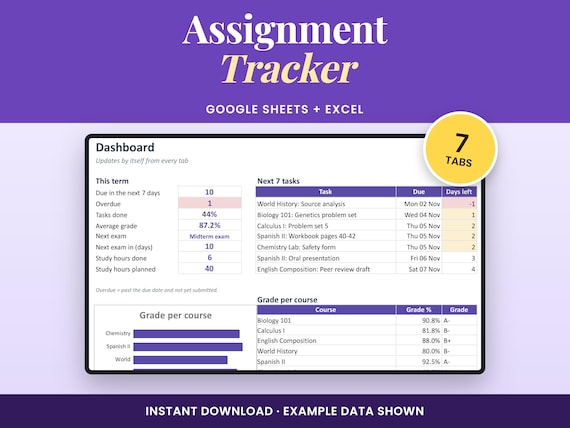
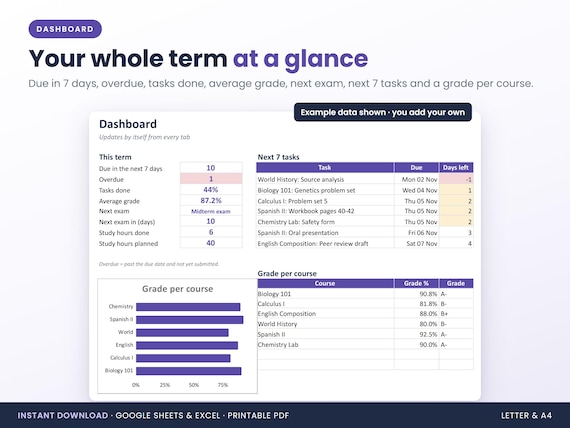
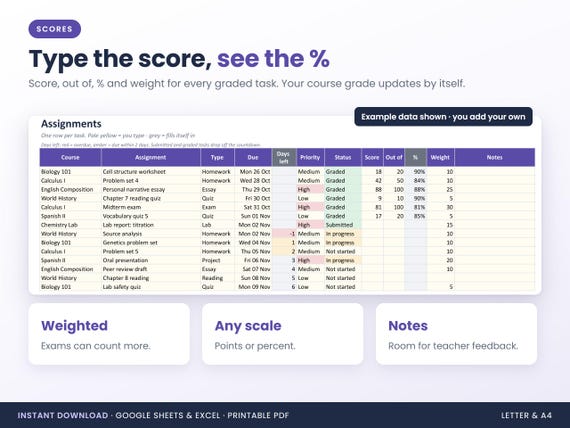
Every assignment, due date, exam and grade in one calm place. The Dashboard shows what is due in the next 7 days, what is overdue, your next seven tasks and your grade in every course. Type a score and the weighted grade updates by itself. For high school and college students. Use it in Google Sheets or Excel, and print the matching pages.
$4.79 $7.99 on Etsy (shop sale)
Buy on EtsySecure checkout on Etsy. Files are ready at once under Purchases.
Quick facts
| What it is | Assignment Tracker for Students |
|---|---|
| Best for | high school and college students tracking assignments, exams and grades |
| Works with | free Google Sheets and Microsoft Excel (computer; view on phone or tablet) |
| Format | spreadsheet (.xlsx) plus printable PDFs in A4 and US Letter |
| Inside | 7 tabs + printables |
| Price | $4.79 on Etsy |
| Delivery | Instant download, nothing is shipped |
What’s inside
- Assignment tracker spreadsheet (.xlsx) for Google Sheets and Excel:
- Start Here: set-up in plain words
- Dashboard: due in the next 7 days, overdue, tasks done %, average grade, next exam and days left, study hours done and planned, your next 7 tasks (overdue first) and a grade per course with a chart
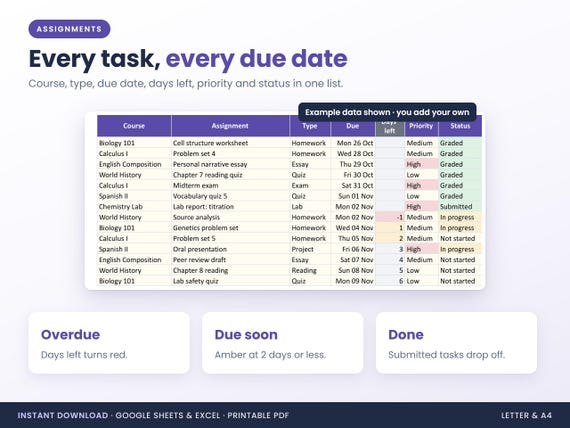
- Assignments: 200 rows with course, task, type, due date, days left (red when overdue, amber at 2 days), priority, status, score, out of, % and weight
- Week: pick a Monday and see everything due that week, day by day (up to 6 tasks a day)
- Exams: 40 rows with date, days left, topics, study hours planned and done, Ready % and score
- Grades: per course: tasks, done, overdue, due in 7 days, weighted grade % and letter grade
- Settings: name, term, up to 8 courses, task types and an editable grade scale (A+ to F)
How to use it
- Buy on Etsy and download the .xlsx file from Purchases.
- Upload it to Google Drive and open with free Google Sheets, or open it in Excel.
- Type your own numbers; the dashboard fills itself in.
Questions
Who is the Assignment Tracker for Students for?
It is made for high school and college students tracking assignments, exams and grades.
What do I get with the Assignment Tracker for Students?
7 tabs + printables. Format: spreadsheet (.xlsx) plus printable PDFs in A4 and US Letter. Works with free Google Sheets and Microsoft Excel (computer; view on phone or tablet).
Do I need to pay for Google Sheets or Excel?
No. Google Sheets is free with a Google account. The file also opens in Microsoft Excel.
How do I open it in Google Sheets?
Download the .xlsx from Etsy, upload it to Google Drive and open it with Google Sheets. It takes about 2 minutes.
Does it work in my currency?
Yes. Type your own currency symbol; it works for US dollars, pounds, euros and any other currency.
How do I get the files?
Buy on Etsy and the files are ready at once under Purchases in your Etsy account, plus a link by email.
What if a file does not open?
Message the shop on Etsy. We reply within 24 hours and fix it.
How it’s made
Designed by our shop with the help of AI tools for drafting layouts, formulas and wording. Every page and tab is reviewed, edited and tested by us in Excel and Google Sheets before it is listed. The dashboard numbers were checked against a separate calculation.